
This Challenge is about learning to add React components to your Gatsby sites, and specifically adding a contact form with the Formik React Library into your site.
Installing Formik library.
First at all install the npm into your site folder:
npm i formik
Now create a new contact.js page, adding import { useFormik } from 'formik' there:
import React from "react"
import { useStaticQuery, Link, graphql } from "gatsby"
import PropTypes from "prop-types"
import Layout from "../components/layout"
import SEO from "../components/seo"
import { useFormik } from 'formik';

const ContactPage = ({ children }) => {
  const data = useStaticQuery(graphql`
     {
      site {
        siteMetadata {
          title
          role
          description
        }
      }
    }
  `)

  return (
    <Layout>
      <SEO title="Contact me" description={data.site.siteMetadata.description} />
      <article className="article">
        <h2 className="article__title article__title--remark t-c">I’m Alberto Fortes, Front-end developer. Drop me a few lines!</h2>
        <div className="article__cont">
          TO DO: FORM
        </div>
      </article>
    </Layout>
  )
}

ContactPage.propTypes = {
  children: PropTypes.node.isRequired,
}

export default ContactPage
We can add form now. The result will be this:
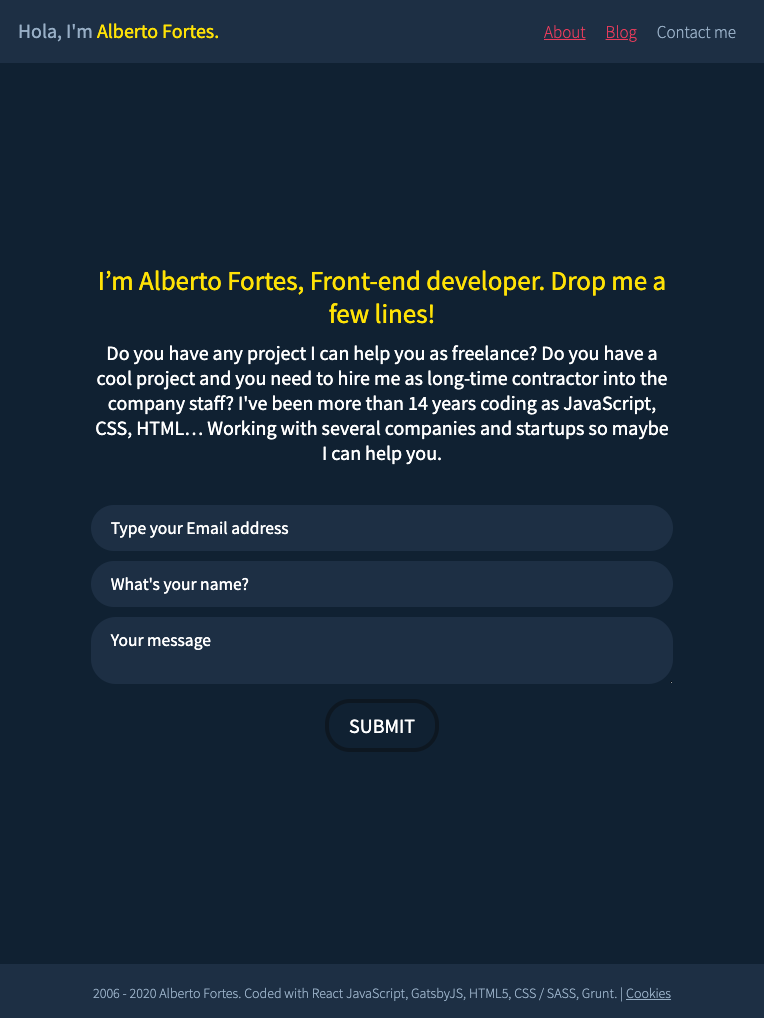
The HTML (JSX) would be:
<form className="genericforms" onSubmit={formik.handleSubmit}>
{ ( (formik.touched.your_name && formik.errors.your_name) || (formik.touched.your_email && formik.errors.your_email) || (formik.touched.your_message && formik.errors.your_message) )
  ? <div className="genericforms__alert">
      { formik.errors.your_email ? (<p>{formik.errors.your_email}</p>) : null }
      { formik.errors.your_name ? (<p>{formik.errors.your_name}</p>) : null }
      { formik.errors.your_message ? (<p>{formik.errors.your_message}</p>) : null }
    </div>
  : null
}

<div className="genericforms__field">
  <label className="sr-only" htmlFor="your_email">Your Email address</label>
  <input className="genericforms__field__text" placeholder="Type your Email address" id="your_email" name="your_email" type="email" onChange={formik.handleChange} value={formik.values.your_email} />
</div>
<div className="genericforms__field">
  <label className="sr-only" htmlFor="your_name">Your Name</label>
  <input className="genericforms__field__text" placeholder="What's your name?" id="your_name" name="your_name" type="text" onChange={formik.handleChange} value={formik.values.your_name} />
</div>
<div className="genericforms__field genericforms__field--one-row">
  <label className="sr-only" htmlFor="your_message">Your message</label>
  <textarea className="genericforms__field__text" placeholder="Your message" id="your_message" name="your_message" onChange={formik.handleChange} value={formik.values.your_message} />
</div>
<div className="genericforms__field genericforms__field--one-row">
  <button className="genericforms__field__btn" type="submit">Submit</button>
</div>
</form>
And above that, before the render method, we need to add some JavaScript to configure Formik:
const ContactPage = ({ children }) => {
  […]
  const validate = values => {
    const errors = {};
    if (!values.your_name) {
      errors.your_name = 'Your name is a required field.';
    }

    if (!values.your_message) {
      errors.your_message = 'Message required.';
    } else if (values.your_message.length < 15) {
      errors.your_message = 'Must be 15 characters at least.';
    }

    if (!values.your_email) {
      errors.your_email = 'Your email is a required field';
    } else if (!/^[A-Z0-9._%+-]+@[A-Z0-9.-]+\.[A-Z]{2,4}$/i.test(values.your_email)) {
      errors.your_email = 'Invalid email address.';
    }

    return errors;
  };

  // Pass the useFormik() hook initial form values and a submit function that will be called when the form is submitted
  const formik = useFormik({
    initialValues: {
      your_email: '',
      your_name: '',
      your_message: '',
    },
    validate,
    onSubmit: values => {
      alert(JSON.stringify(values, null, 2));
    },
  });

  return (
    […]
  )
}